
Detect train/test duplicate images and deliver an offline-verifiable dataset
Find duplicate images leaked between train and test folders locally, create a corrected version, and let recipients verify the signed archive offline.
This 5-minute walkthrough uses a downloadable 3-image sample where one image intentionally appears in both train/ and test/. Everything runs locally on SQLite with zero cloud API keys, no external database, and no uploads to third-party servers.
What you will verify in 5 minutes
| Checkpoint | What Datakeel shows |
|---|---|
| 1. Where is the duplicate? | Blocked by cross-split leakage (Train 1 · Validation 0 · Test 2), flagging train/loading-bay/image.png and test/loading-bay-copy/image.png with Identical Content · Distance 0 and Similar Images · Distance 0. |
| 2. How many images remain after fixing? | 2 files (Train 1 · Validation 0 · Test 1) in a new immutable version after excluding test/loading-bay-copy/image.png. The original 3-file version stays intact as the baseline, and re-checking shows 0 leakage pairs. |
| 3. What does the recipient see offline? | uvx datakeel reconcile v1.0.0.tar.gz exits 0, prints PASS across all 6 categories, and verifies Delivery review: directory-leakage-v1 (train=1, test=1; signals=exact, image, text, group; leakage=0) without a server or database. |
1. Download the 3-image sample and start Datakeel
Download and unzip the deterministic 3-image fixture:
unzip warehouse-leakage-sample.zip
The unzipped folder contains three annotated warehouse images across train/ and test/. train/loading-bay/image.png and test/loading-bay-copy/image.png are byte-identical duplicates, and test/entrance/ intentionally omits caption.txt so you can see missing-sidecar detection in the import preview:
warehouse-leakage-sample/
  train/
    loading-bay/
      image.png
      caption.txt
      annotations.json
  test/
    loading-bay-copy/
      image.png
      caption.txt
      annotations.json
    entrance/
      image.png
      annotations.json
Start Datakeel locally in one command (install uv first if needed):
uvx datakeel demo
# Web UI: http://127.0.0.1:8765
If you are running from a source checkout, use uv sync --locked && uv run datakeel demo.
2. Import the folder and find cross-split duplicates
Open http://127.0.0.1:8765, go to Data library → Import images, click Choose image folder, and select the unzipped warehouse-leakage-sample folder.
- Supported formats: PNG, JPEG, and WebP (up to 2,000 images and sidecar files per batch, 256 MiB total).
- Relative paths supply sample names and partition names (
train/,val/,test/). Caption and annotation files are optional; unreadable images are skipped by default when detected. - In Folder preview, confirm you see 3 Images, 2 With Captions, and 3 With Annotations (
test/entrance/image.pngshowsCaption · missing).

Enter a dataset name such as Warehouse images and click Import dataset. Datakeel imports the files into an immutable version and opens the Versions tab.
In Dataset delivery review, click Check imported splits.
Result 1: Where is the duplicate?
Datakeel marks the 3-file candidate Blocked by cross-split leakage (Train 1 Validation 0 Test 2) and displays 2 measured signals across partitions side by side:
- Matched pair:
train/loading-bay/image.png(Train,pallet) andtest/loading-bay-copy/image.png(Test,pallet). - Signals:
Identical Content · Distance 0(exact SHA-256) andSimilar Images · Distance 0(64-bit perceptual dHash).
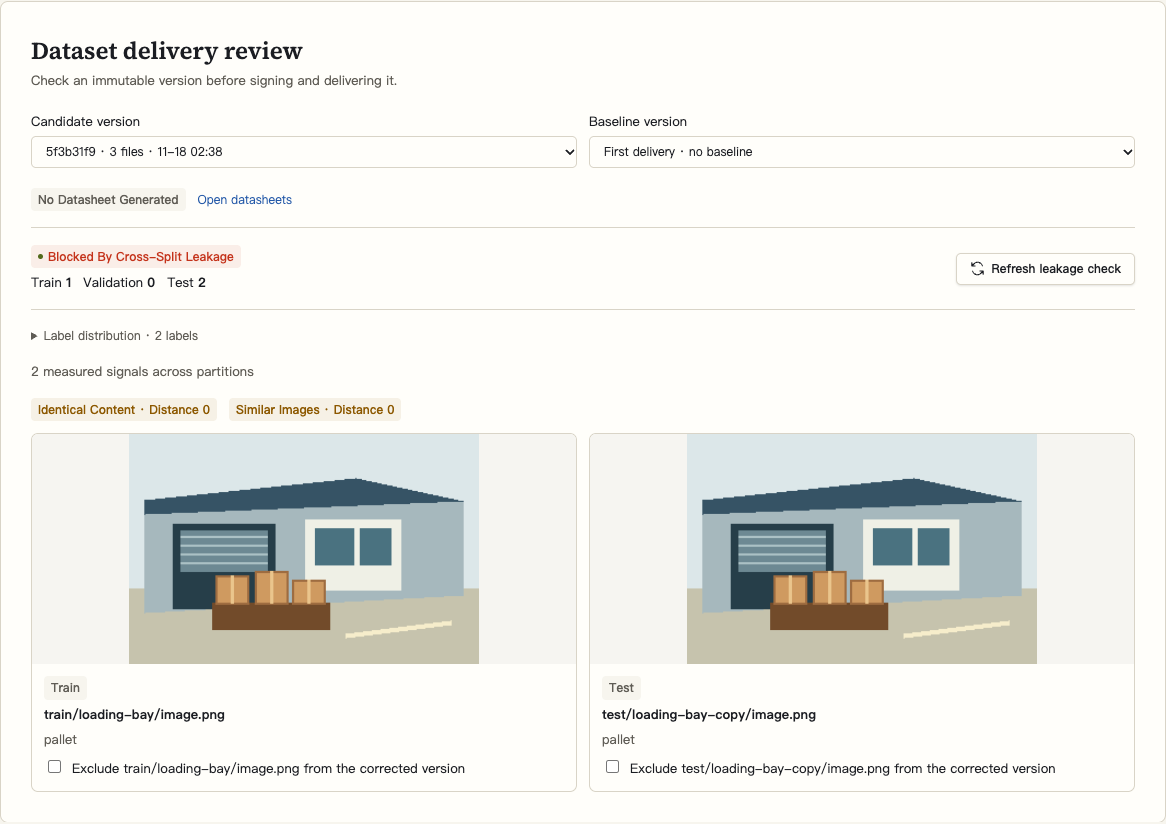
3. Exclude the leaked copy and verify the corrected version
Check Exclude test/loading-bay-copy/image.png from the corrected version, then click Review corrected version and Execute action.
Result 2: How many images remain after fixing?
- Datakeel creates a new immutable version containing 2 files (
train/loading-bay/image.pngandtest/entrance/image.png). - The original 3-file version remains unchanged and selectable as the Baseline version for audit comparison.
- With the new 2-file version selected as Candidate version, click Check imported splits again. The status switches to Ready for release review with
Train 1 Validation 0 Test 1and 0 leakage pairs.
Checks are bound to each candidate version; confirm the 2-file corrected version is selected before preparing a release.
4. Sign, export, and verify offline on the recipient's machine
Expand Sign and deliver this candidate, enter semantic version tag v1.0.0, click Review release plan, and confirm Approve and publish release.
During publication, the server re-verifies that the checked directory split matches the exact candidate version and freezes the proof—rule, checked signals, split ID, counts, zero-leakage status, and baseline version ID—into the release's delivery_review metadata.
Open the published release v1.0.0, click Export delivery package, and send the resulting archive (for example v1.0.0.tar.gz) to the recipient.
Result 3: What the recipient sees when verifying offline
The recipient needs no Datakeel server, database, object store, or network access. With uvx installed (or uv run datakeel reconcile ... in a source checkout), they run:
uvx datakeel reconcile v1.0.0.tar.gz
Verified terminal output for the 2-file release (exit status 0):
文件数 / File count: 通过 / PASS
字节数 / Bytes: 通过 / PASS
内容哈希 / Content hashes: 通过 / PASS
标注与标签 / Annotations and labels: 通过 / PASS
元数据 / Metadata: 通过 / PASS
血缘引用 / Lineage: 通过 / PASS
交付审查证明 / Delivery review: directory-leakage-v1 (train=1, test=1; signals=exact, image, text, group; leakage=0)
For CI pipelines or automated acceptance gates, pass --json:
uvx datakeel reconcile v1.0.0.tar.gz --manifest MANIFEST.json --json
Verified --json output (UUIDs, split_id, and created_at vary per run):
{
  "categories": [
    { "differences": [], "name": "file_count", "passed": true },
    { "differences": [], "name": "bytes", "passed": true },
    { "differences": [], "name": "hashes", "passed": true },
    { "differences": [], "name": "annotations", "passed": true },
    { "differences": [], "name": "metadata", "passed": true },
    { "differences": [], "name": "lineage", "passed": true }
  ],
  "delivery_review": {
    "baseline_version_id": "<original-3-file-version-id>",
    "checked_signals": ["exact", "image", "text", "group"],
    "distributions": [
      { "count": 1, "labels": [], "split": "train" },
      { "count": 0, "labels": [], "split": "val" },
      { "count": 1, "labels": [], "split": "test" }
    ],
    "image_threshold": 8,
    "leakage_pairs": 0,
    "rule": "directory-leakage-v1",
    "sample_count": 2,
    "split_algorithm_version": "1.3-iterative-text",
    "split_id": "<checked-split-id>",
    "version_id": "<corrected-2-file-version-id>"
  },
  "passed": true
}
How the recipient knows the archive was not tampered with
- Exit status is
0only when all six categories pass,1on any mismatch or tampered manifest/payload, and2when the archive or manifest cannot be parsed. datakeel reconcilehashes every payload file againstMANIFEST.json, checks the canonicalmanifest_sha256checksum, and independently verifies thatdelivery_review.version_idmatchesMANIFEST.json'ssource_versionand total partitioned file count.- Flipping even one byte of an image or editing a field inside
MANIFEST.jsonorRECORDS.jsoncausesreconcileto exit1, failhashesormetadata, and omitdelivery_reviewfrom the passing receipt.
Using your own annotated image folder
- Put samples under at least two populated partition folders such as
train/andtest/(ortrain/,val/,test/). Unsplit folders can still be imported, but delivery review requires at least two populated partitions. - Datakeel checks exact SHA-256, 64-bit perceptual dHash (default Hamming distance threshold
8, catching re-encoded or resized near-duplicates across splits), SimHash text fingerprints, and group keys. - See delivery verification for archive structure and tamper exercises, and training datasets for leakage signal details.